Unix Timestamp Converter – Complete Guide to Epoch Time Conversion
Have you ever looked at a server log and seen a number like "1730200000" and had no idea what time that represented? Or maybe you have worked with an API that returned timestamps, and you needed to convert them to something humans can read?
I remember debugging a server issue late at night. The error log showed timestamps like "1697485800" and "1697485900". I had no idea when these errors happened. Was it 5 minutes ago? 5 hours ago? I could not tell. I had to copy the numbers into a converter just to understand the timeline.
After that experience, I learned about Unix timestamps. Now I can look at a timestamp and roughly know when it represents. I also know how to convert between timestamps and dates in any programming language. This guide will teach you everything you need to know about Unix timestamps.
Quick access: Use our free Unix timestamp converter here
What is a Unix Timestamp? Simple Answer
A Unix timestamp (also called Epoch time) is the number of seconds that have elapsed since January 1, 1970, at 00:00:00 UTC. This specific moment is called the Unix Epoch.
Simple examples:
- Timestamp
0= January 1, 1970, 00:00:00 UTC - Timestamp
60= January 1, 1970, 00:01:00 UTC (60 seconds later) - Timestamp
86400= January 2, 1970, 00:00:00 UTC (one day later) - Timestamp
1730200000= around October 29, 2024 (depending on your timezone)
Think of it like a stopwatch that started counting on January 1, 1970, and has been running ever since. Every second that passes increases the number by 1.
Why Unix Timestamps Are Used
Unix timestamps are everywhere in computing. Here is why they are so popular.
For developers:
- Universal format understood by all programming languages
- Easy to store in databases (just a single number)
- Simple to compare (which timestamp is larger = which happened later)
- Easy to calculate differences (subtract one timestamp from another)
For APIs:
- No ambiguity about date formats (is 10/16/2025 October 16 or 10 October?)
- No confusion about timezones (timestamps are always UTC)
- Compact (10-13 digits instead of 19+ characters)
For databases:
- Efficient storage (4 bytes for seconds, 8 bytes for milliseconds)
- Fast indexing and sorting
- Easy to convert to any timezone for display
For logging:
- Chronological ordering without parsing dates
- Compact format saves space in log files
- Easy to calculate time between log entries
Unix Timestamp Formats: Seconds vs Milliseconds
Unix timestamps come in two common formats. It is important to know the difference.
Seconds Timestamp (10 digits)
This is the original Unix timestamp format. It counts seconds since the epoch.
Example: 1730200000 (10 digits)
Range: Can represent dates from 1901 to 2038 (32-bit systems have limitations)
When to use: Most APIs, databases, and standard Unix systems
Milliseconds Timestamp (13 digits)
This format counts milliseconds since the epoch. It is more precise.
Example: 1730200000000 (13 digits)
How to convert: Multiply seconds timestamp by 1000
When to use: JavaScript (Date.now()), Java (System.currentTimeMillis()), high-precision applications
How to Tell Them Apart
| Length | Format | Example |
|---|---|---|
| 10 digits | Seconds | 1730200000 |
| 13 digits | Milliseconds | 1730200000000 |
Rule of thumb: If the number is around 1.7 billion (10 digits), it is seconds. If it is around 1.7 trillion (13 digits), it is milliseconds.
How to Convert Unix Timestamp to Date
Converting a Unix timestamp to a human-readable date is straightforward.
Manual Conversion (Understanding the Process)
Example: Convert timestamp 1730200000 to a date
Step 1: Know that the epoch is January 1, 1970, 00:00:00 UTC
Step 2: 1730200000 seconds ÷ 86400 seconds per day = approximately 20,025 days
Step 3: 20,025 days from January 1, 1970 = around October 29, 2024
Step 4: Add the remainder seconds to get the exact time
Result: October 29, 2024, 05:06:40 UTC (approximately)
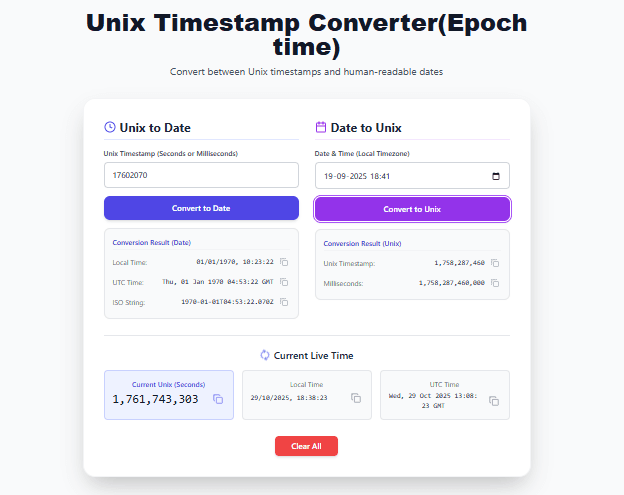
Using Our Converter
Our Unix timestamp converter does this instantly.
Step 1: Enter the timestamp (e.g., 1730200000)
Step 2: Click "Convert to Date"
Step 3: View results in:
- Local time (your computer's timezone)
- UTC time
- ISO format (machine-readable)
How to Convert Date to Unix Timestamp
Converting a date to a Unix timestamp is also simple.
Manual Conversion (Understanding the Process)
Example: Convert October 29, 2024, 05:06:40 UTC to a timestamp
Step 1: Calculate days since epoch: October 29, 2024 is approximately 20,025 days after January 1, 1970
Step 2: 20,025 days × 86,400 seconds/day = 1,730,160,000 seconds
Step 3: Add the seconds from time of day: 5 hours × 3600 = 18,000; 6 minutes × 60 = 360; 40 seconds = 40; total = 18,400
Step 4: Add them together: 1,730,160,000 + 18,400 = 1,730,178,400
Result: 1730178400 (approximately)
Using Our Converter
Step 1: Select a date and time using the date picker
Step 2: Click "Convert to Unix"
Step 3: View results in:
- Seconds (10-digit timestamp)
- Milliseconds (13-digit timestamp)
The Unix Epoch Explained
The Unix Epoch (January 1, 1970, 00:00:00 UTC) is the starting point for all Unix timestamps.
Why January 1, 1970?
The choice was somewhat arbitrary. Early Unix developers chose this date because it was convenient for the early versions of the operating system. It has since become the standard across computing.
Important Dates Since the Epoch
| Date (UTC) | Seconds Since Epoch |
|---|---|
| January 1, 1970, 00:00:00 | 0 |
| January 1, 1970, 00:01:00 | 60 |
| January 1, 1970, 01:00:00 | 3,600 |
| January 2, 1970, 00:00:00 | 86,400 |
| January 1, 1971, 00:00:00 | 31,536,000 (365 days) |
| January 1, 2000, 00:00:00 | 946,684,800 |
| January 1, 2020, 00:00:00 | 1,577,836,800 |
| January 1, 2025, 00:00:00 | 1,735,689,600 |
Notable Timestamps
| Event | Timestamp (seconds) |
|---|---|
| My birthday (example) | 750,000,000 (approx) |
| January 1, 2000 (Y2K) | 946,684,800 |
| September 11, 2001 attacks | 1,000,000,000 (approx) |
| January 1, 2020 | 1,577,836,800 |
| January 19, 2038 (32-bit overflow) | 2,147,483,647 |
The Year 2038 Problem (Unix Millennium Bug)
The Year 2038 problem is a real issue that affects systems using 32-bit signed integers to store Unix timestamps.
What is the Problem?
A 32-bit signed integer can store values from -2,147,483,648 to 2,147,483,647.
The maximum positive value (2,147,483,647) corresponds to January 19, 2038, at 03:14:07 UTC.
After this moment, the timestamp "wraps around" and becomes negative, representing dates in 1901 instead of 2038.
Which Systems Are Affected?
- Older embedded systems
- Legacy mainframes
- Some file systems
- Older databases
- Some older programming languages
Which Systems Are Safe?
- Most modern systems use 64-bit timestamps (good until the year 292 billion)
- Linux kernels after 2020 (64-bit)
- Windows (uses different time representation)
- Modern programming languages (Python, Java, C# use 64-bit)
What You Can Do
- Ensure your systems use 64-bit timestamps
- Upgrade legacy systems before 2038
- Test your systems for 2038 compliance
Timezones and Unix Timestamps
One of the best features of Unix timestamps is that they are timezone-agnostic.
UTC is the Standard
Unix timestamps always represent UTC time. This is critical to understand.
Example: Timestamp 1730200000 is the same moment in time everywhere in the world.
- In UTC: October 29, 2024, 05:06:40
- In New York (UTC-4): October 29, 2024, 01:06:40
- In London (UTC+1): October 29, 2024, 06:06:40
- In India (UTC+5:30): October 29, 2024, 10:36:40
- In Tokyo (UTC+9): October 29, 2024, 14:06:40
Converting to Local Time
When you display a timestamp to a user, you convert it from UTC to their local timezone. The underlying timestamp does not change.
Best Practices
- Store in UTC: Always store timestamps in UTC (seconds since epoch)
- Convert for display: Convert to local time only when showing to users
- Never store local time: Do not store timestamps with timezone offsets. Store UTC and convert.
Real-Life Examples of Timestamp Usage
Example 1: Debugging Server Logs
Problem: A server log shows error timestamps: 1697485800, 1697485900, 1697486000.
Using a timestamp converter:
1697485800= October 16, 2023, 14:30:00 UTC1697485900= October 16, 2023, 14:31:40 UTC1697486000= October 16, 2023, 14:33:20 UTC
Conclusion: Errors occurred within a 3-minute window.
Example 2: API Response Timestamp
Problem: An API returns {"created_at": 1697485800}. You need to display this to a user in India.
Solution:
- Convert
1697485800to UTC = October 16, 2023, 14:30:00 UTC - Convert UTC to IST (UTC+5:30) = October 16, 2023, 20:00:00 IST
- Display: "Created on October 16, 2023, at 8:00 PM IST"
Example 3: Database Query
Problem: You need to find all records created in the last 7 days.
Solution using timestamps:
- Current timestamp:
1730200000 - 7 days ago = 7 × 86,400 = 604,800 seconds
- Query:
WHERE created_at > 1729595200
No date parsing needed. Simple integer comparison.
Example 4: Cache Expiration
Problem: You want to set a cache expiration 1 hour from now.
Solution using timestamps:
- Current timestamp:
1730200000 - 1 hour = 3,600 seconds
- Expiration timestamp =
1730203600
Example 5: Log File Analysis
Problem: You have log entries with timestamps and need to calculate the duration between two events.
Solution:
- Event A timestamp:
1697485800 - Event B timestamp:
1697485900 - Duration = 100 seconds (1 minute 40 seconds)
Timestamp Conversion in Popular Programming Languages
JavaScript
// Get current timestamp (milliseconds)
const nowMs = Date.now();

// Get current timestamp (seconds)
const nowSec = Math.floor(Date.now() / 1000);

// Convert timestamp to Date object
const date = new Date(1730200000 * 1000);

// Convert Date to timestamp
const timestamp = Math.floor(new Date('2025-10-16') / 1000);
Python
import time
import datetime

# Get current timestamp (seconds)
now = int(time.time())

# Convert timestamp to datetime
dt = datetime.datetime.fromtimestamp(1730200000)

# Convert datetime to timestamp
timestamp = int(dt.timestamp())
Java
// Get current timestamp (milliseconds)
long nowMs = System.currentTimeMillis();

// Get current timestamp (seconds)
long nowSec = nowMs / 1000;

// Convert timestamp to Date
Date date = new Date(1730200000 * 1000L);

// Convert Date to timestamp
long timestamp = date.getTime() / 1000;
MySQL
-- Convert timestamp to datetime
SELECT FROM_UNIXTIME(1730200000);

-- Convert datetime to timestamp
SELECT UNIX_TIMESTAMP('2025-10-16 12:00:00');

-- Get current timestamp
SELECT UNIX_TIMESTAMP();
PostgreSQL
-- Convert timestamp to datetime
SELECT TO_TIMESTAMP(1730200000);

-- Convert datetime to timestamp
SELECT EXTRACT(EPOCH FROM TIMESTAMP '2025-10-16 12:00:00');

-- Get current timestamp
SELECT EXTRACT(EPOCH FROM NOW());
How to Use Our Unix Timestamp Converter
Our Unix timestamp converter makes conversions simple.
Live Clock Feature:
- Shows current Unix timestamp in seconds (updates every second)
- Shows current local time
- Shows current UTC time
Timestamp to Date Mode:
- Enter a Unix timestamp (seconds or milliseconds)
- Tool auto-detects the format
- Click "Convert to Date"
- View local time, UTC time, and ISO format
- Copy any result with one click
Date to Timestamp Mode:
- Select a date and time using the date picker
- Click "Convert to Unix"
- View timestamp in seconds and milliseconds
- Copy the result
Clear All: Reset all fields and start over
All conversions happen in your browser. No data is sent to any server.
Common Timestamp Mistakes
Mistake 1: Confusing Seconds and Milliseconds
Problem: Using a milliseconds timestamp (13 digits) where seconds are expected (10 digits)
Solution: If the number is around 1.7 trillion, divide by 1000 to get seconds.
Mistake 2: Forgetting Timezone Conversion
Problem: Displaying a UTC timestamp as local time without converting
Solution: Convert UTC timestamp to local time before displaying to users.
Mistake 3: Using Timestamps for Human-Readable Output
Problem: Showing a raw timestamp (1730200000) to end users
Solution: Always convert timestamps to human-readable dates before showing to users.
Mistake 4: Not Handling Negative Timestamps
Problem: Some systems use negative timestamps for dates before 1970
Solution: Handle negative timestamps if your application needs pre-1970 dates.
Mistake 5: Assuming All Timestamps Are UTC
Problem: Some systems store timestamps with timezone offsets
Solution: Always verify what a timestamp represents. Standard Unix timestamps are UTC.
Frequently Asked Questions
Q: What is a Unix timestamp?
A: A Unix timestamp is the number of seconds since January 1, 1970, 00:00:00 UTC. It is a universal way to represent time in computing.
Q: How to convert Unix timestamp to date?
A: Use our Unix timestamp converter. Enter the timestamp, click convert, and see the readable date in local time and UTC.
Q: How to get current Unix timestamp?
A: Our tool shows the current timestamp in real-time. In JavaScript, use Math.floor(Date.now() / 1000). In Python, use int(time.time()).
Q: What is the difference between seconds and milliseconds timestamps?
A: Seconds timestamps have 10 digits (e.g., 1730200000). Milliseconds timestamps have 13 digits (e.g., 1730200000000). Milliseconds are 1000 times larger.
Q: What is the Unix epoch?
A: The Unix epoch is January 1, 1970, 00:00:00 UTC. It is the starting point for all Unix timestamps.
Q: What is the Year 2038 problem?
A: On January 19, 2038, at 03:14:07 UTC, 32-bit Unix timestamps will overflow and wrap around to negative numbers, representing dates in 1901.
Q: Are Unix timestamps always UTC?
A: Yes. Standard Unix timestamps always represent UTC time. They are timezone-agnostic.
Q: How to convert timestamp to local time?
A: Use our converter. It automatically shows both local time (your system timezone) and UTC time.
Q: How to convert date to timestamp?
A: Use our date picker to select a date and time. Click "Convert to Unix" to get the timestamp in seconds and milliseconds.
Q: What timestamp format does JavaScript use?
A: JavaScript uses milliseconds timestamps (13 digits). Date.now() returns milliseconds.
Q: What timestamp format does Python use?
A: Python uses seconds timestamps (10 digits) by default with the time module.
Q: What timestamp format does MySQL use?
A: MySQL uses seconds timestamps with the UNIX_TIMESTAMP() function.
Q: What is timestamp 0?
A: Timestamp 0 represents January 1, 1970, 00:00:00 UTC.
Q: Can timestamps be negative?
A: Yes. Negative timestamps represent dates before 1970. For example, timestamp -86400 represents December 31, 1969.
Q: Is the Unix timestamp converter free?
A: Yes. Completely free. No signup. No limits.
My Final Advice
After years of working with Unix timestamps in logs, databases, and APIs, here is what I have learned.
Always store timestamps in UTC. Never store local time with offsets. Store seconds since epoch. Convert to local time only when displaying to users.
Use seconds timestamps for storage. They are more compact and easier to work with than milliseconds. Use milliseconds only when you need sub-second precision.
Convert timestamps before showing to users. A raw number like 1730200000 means nothing to most people. Convert it to a readable date and time in their local timezone.
Be aware of the Year 2038 problem. If you maintain legacy systems, ensure they will be upgraded or retired before 2038. Most modern systems use 64-bit timestamps and are safe.
Use a timestamp converter for debugging. When reading logs or API responses, convert timestamps to understand the timeline. Our tool makes this instant.
Learn the common ranges. Knowing that 1 billion seconds is around 2001, 1.5 billion is around 2017, and 2 billion is around 2033 helps you estimate without a converter.
And finally, use a good timestamp converter. Our tool handles both seconds and milliseconds, shows local and UTC time, and works instantly.
Convert Unix Timestamps Now – Free Tool
Have questions about Unix timestamps for a specific use case? Leave a comment below. I try to answer every one.
Tags: unix timestamp converter, how to convert unix timestamp, epoch time converter, timestamp to date, date to unix timestamp, unix time calculator, convert unix seconds to date, unix timestamp to human readable, epoch to datetime, datetime to epoch, unix timestamp milliseconds, current unix timestamp, unix epoch explained, unix timestamp examples, timestamp conversion tool, unix timestamp for developers, unix timestamp for databases, unix timestamp for apis, convert timestamp to local time, convert timestamp to utc, javascript timestamp conversion, python timestamp conversion, java timestamp conversion, mysql timestamp conversion, postgresql timestamp conversion, unix timestamp 0 meaning, unix timestamp overflow, year 2038 problem, unix timestamp best practices, timestamp debugging