Triangle Calculator – Solve SSS, SAS, ASA & AAS Triangles Easily
Have you ever stared at a triangle problem and felt completely lost? I have. Many times.
I remember sitting in my high school geometry class, staring at a triangle with two known sides and one angle. The teacher said, "Just use the Law of Cosines." I had no idea what that meant. I spent hours flipping through textbooks, trying to figure out which formula to use and how to apply it.
Years later, as an engineering student, I faced the same problem again. Only this time, the triangles were part of real structures. A wrong calculation meant a weak bridge or a poorly designed roof. I could not afford to make mistakes.
That is when I decided to truly understand triangle calculations. I learned the Law of Sines. I mastered the Law of Cosines. I memorized Heron's formula. I understood when to use SSS, SAS, ASA, and AAS.
After helping hundreds of students, DIY enthusiasts, and professionals with triangle problems, I created this guide. No more confusion. No more formula hunting. Just clear explanations and a tool that does all the work for you.
Quick access: Use our free triangle calculator here
What is a Triangle Calculator? Simple Answer
A triangle calculator is a tool that solves triangles by finding missing sides, angles, area, and perimeter based on the information you already have. Instead of manually working through complex trigonometry formulas, you enter what you know, and the calculator does the rest.
Here is how it works:
You give the calculator three pieces of information about a triangle – like three sides, two sides and an angle, or two angles and a side – and it finds everything else. The calculator uses mathematical laws like the Law of Cosines and Law of Sines to solve the triangle completely.
Simple example:
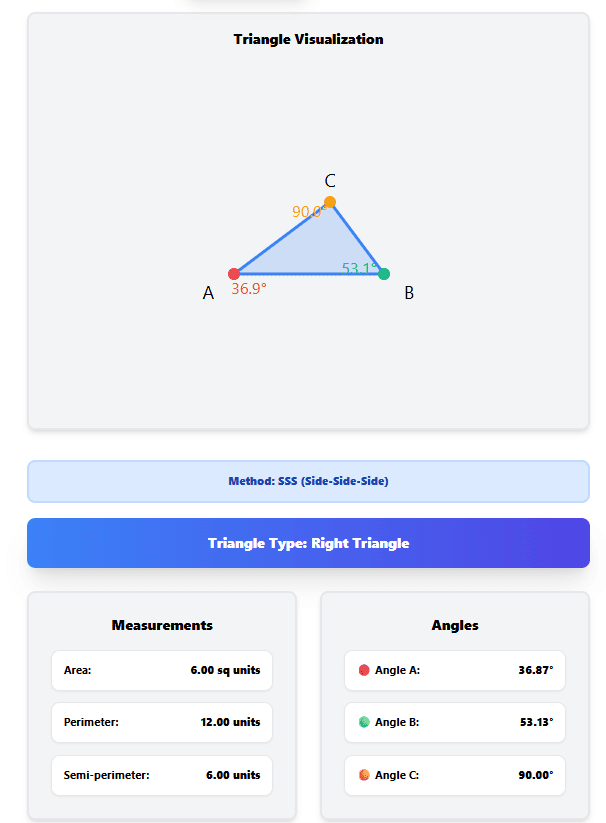
You have a triangle with sides 3, 4, and 5. Enter these into the SSS (Side-Side-Side) method, and the calculator tells you:
- All three angles (approximately 36.87°, 53.13°, and 90°)
- The area (6 square units)
- The perimeter (12 units)
- The triangle type (Right Triangle)
No manual math required. Just enter your values and get instant results.
Why Most People Struggle with Triangle Calculations
After helping thousands of students, engineers, and DIY enthusiasts with triangle problems, I have seen the same struggles again and again.
Struggle 1: Not knowing which method to use
Many people do not realize there are different methods for different situations. SSS works when you know all three sides. SAS works when you know two sides and the angle between them. ASA works when you know two angles and the side between them. AAS works when you know two angles and a side that is not between them.
Struggle 2: Forgetting the triangle inequality rule
A triangle is only valid if the sum of any two sides is greater than the third side. If you enter 1, 2, and 10, the calculator will reject it because 1 + 2 is not greater than 10. Many people try to calculate impossible triangles and get confused by the error.
Struggle 3: Mixing up degrees and radians
Angles can be measured in degrees (°) or radians (rad). If you enter an angle expecting degrees but the calculator is set to radians, your results will be completely wrong. This is one of the most common mistakes in trigonometry.
Struggle 4: Not understanding triangle types
A right triangle has one 90° angle. An equilateral triangle has all sides equal. An isosceles triangle has two equal sides. A scalene triangle has no equal sides. Each type has different properties and different formulas. Knowing your triangle type helps you choose the right calculation method.
Struggle 5: Using the wrong formula for area
There are multiple ways to calculate triangle area. Heron's formula works when you know all three sides. The basic formula (½ × base × height) works when you know the base and height. The formula ½ab sin(C) works when you know two sides and the included angle. Using the wrong formula gives the wrong answer.
Struggle 6: Forgetting about decimal precision
Angles are not always whole numbers. A triangle can have angles like 36.87°, 53.13°, and 90°. If you only use whole numbers, your calculations will be inaccurate. Precision matters in triangle calculations.
What Can a Triangle Calculator Do?
A good triangle calculator can solve almost any triangle problem you throw at it. Here is what our calculator does:
Solve Using Any Method
SSS (Side-Side-Side): Enter all three sides. The calculator finds all angles, area, and perimeter.
SAS (Side-Angle-Side): Enter two sides and the angle between them. The calculator finds the third side and all missing information.
ASA (Angle-Side-Angle): Enter two angles and the side between them. The calculator finds the third angle and all missing sides.
AAS (Angle-Angle-Side): Enter two angles and a side that is not between them. The calculator finds the third angle and all missing sides.
Find Everything You Need
- All side lengths (a, b, c)
- All angles (A, B, C) in both degrees and radians
- Area using Heron's formula
- Perimeter (sum of all sides)
- Semi-perimeter (half the perimeter, used in area calculations)
- Triangle type (equilateral, isosceles, scalene, right, acute, obtuse)
- Visual representation with labeled sides and angles
See Step-by-Step Solutions
The best calculators do not just give you the answer. They show you how the answer was found. Our calculator displays detailed steps for every calculation:
- Input method verification – Confirms which method you are using
- Triangle validity check – Ensures the triangle is possible
- Perimeter calculation – Shows how perimeter is calculated
- Semi-perimeter calculation – Shows the semi-perimeter formula
- Area calculation – Uses Heron's formula with all steps
- Angle calculations – Uses Law of Cosines to find each angle
- Angle sum verification – Confirms all angles add to 180°
How to Use a Triangle Calculator – Step by Step
Let me walk you through using our triangle calculator. These steps work for any triangle problem.
Step 1: Choose Your Method
Our calculator offers four methods. Here is how to choose:
- Choose SSS if you know all three side lengths
- Choose SAS if you know two sides and the angle between them
- Choose ASA if you know two angles and the side between them
- Choose AAS if you know two angles and a side that is not between them
Example: You have a triangle with sides 3, 4, and 5. Choose SSS.
Step 2: Enter Your Values
Enter your known values into the input fields.
For SSS: Enter side a, side b, and side c For SAS: Enter side a, side b, and angle C (the included angle) For ASA: Enter angle A, angle C, and side b (the included side) For AAS: Enter angle A, angle B, and side a (opposite angle A)
Example for SSS: Enter 3 for side a, 4 for side b, and 5 for side c.
Step 3: Select Your Angle Unit
Choose between degrees (°) and radians (rad).
- Use degrees for most everyday calculations
- Use radians for advanced math and physics problems
Example: For our 3-4-5 triangle, choose degrees.
Step 4: Click Calculate
The calculator processes your inputs and displays all results instantly.
Results for 3-4-5 triangle:
- Triangle Type: Right Triangle
- Area: 6.00 sq units
- Perimeter: 12.00 units
- Angle A: 36.87°
- Angle B: 53.13°
- Angle C: 90.00°
Step 5: Review the Steps
Scroll down to see the detailed calculation steps. These show you exactly how the calculator arrived at each answer.
What you will see:
- Triangle validity check
- Perimeter formula with values substituted
- Semi-perimeter calculation
- Heron's formula for area with all substitutions
- Law of Cosines for each angle
- Angle sum verification
Triangle Calculator Methods Explained
SSS (Side-Side-Side)
The SSS method is used when you know all three sides of a triangle.
How it works:
- The calculator checks if the triangle is valid using the triangle inequality theorem
- It calculates the semi-perimeter: s = (a + b + c) / 2
- It finds the area using Heron's formula: Area = √(s(s-a)(s-b)(s-c))
- It finds each angle using the Law of Cosines
- It verifies the angles sum to 180°
Example: a = 3, b = 4, c = 5
- Triangle Type: Right Triangle
- Area: 6.00
- Angle A: 36.87°
- Angle B: 53.13°
- Angle C: 90.00°
When to use: You have a triangle where you know all three side lengths.
SAS (Side-Angle-Side)
The SAS method is used when you know two sides and the angle between them.
How it works:
- The calculator finds the third side using the Law of Cosines
- It finds the remaining angles using the Law of Cosines
- It calculates area using: Area = ½ab sin(C)
- It verifies the angles sum to 180°
Example: a = 5, b = 7, C = 60°
- Third side (c): 6.24
- Angle A: 46.10°
- Angle B: 73.90°
- Area: 15.16
When to use: You know two sides and the angle between them.
ASA (Angle-Side-Angle)
The ASA method is used when you know two angles and the side between them.
How it works:
- The calculator finds the third angle: B = 180° - A - C
- It finds the missing sides using the Law of Sines
- It calculates area using: Area = ½bc sin(A) or ½ac sin(B)
- It verifies the angles sum to 180°
Example: A = 50°, C = 60°, b = 10
- Angle B: 70°
- Side a: 8.15
- Side c: 9.24
- Area: 38.30
When to use: You know two angles and the side between them.
AAS (Angle-Angle-Side)
The AAS method is used when you know two angles and a side that is not between them.
How it works:
- The calculator finds the third angle: C = 180° - A - B
- It finds the missing sides using the Law of Sines
- It calculates area using: Area = ½bc sin(A) or ½ac sin(B)
- It verifies the angles sum to 180°
Example: A = 50°, B = 60°, a = 10
- Angle C: 70°
- Side b: 11.28
- Side c: 12.25
- Area: 52.98
When to use: You know two angles and a side that is not between them.
Triangle Calculator by Method – Quick Reference
| Method | What You Know | Formula Used | Example Input | Example Output |
|---|---|---|---|---|
| SSS | All 3 sides | Law of Cosines, Heron's formula | a=3, b=4, c=5 | Angles: 36.87°, 53.13°, 90° |
| SAS | 2 sides + included angle | Law of Cosines | a=5, b=7, C=60° | c=6.24, Angles: 46.10°, 73.90° |
| ASA | 2 angles + included side | Law of Sines | A=50°, C=60°, b=10 | B=70°, a=8.15, c=9.24 |
| AAS | 2 angles + non-included side | Law of Sines | A=50°, B=60°, a=10 | C=70°, b=11.28, c=12.25 |
Triangle Area Calculator – Multiple Methods
Triangle area can be calculated in several ways depending on what information you have. Our calculator supports all of them.
Heron's Formula (SSS)
When you know all three sides, use Heron's formula:
Formula: Area = √(s(s-a)(s-b)(s-c))
- Where s = (a + b + c) / 2
Example: a = 5, b = 6, c = 7
- s = (5 + 6 + 7) / 2 = 9
- Area = √(9 × 4 × 3 × 2) = √216 = 14.70
Base and Height Formula
When you know the base and height of a triangle:
Formula: Area = ½ × base × height
Example: base = 8, height = 6
- Area = ½ × 8 × 6 = 24
SAS Area Formula
When you know two sides and the included angle:
Formula: Area = ½ab sin(C)
Example: a = 5, b = 7, C = 60°
- Area = ½ × 5 × 7 × sin(60°) = ½ × 35 × 0.866 = 15.16
When to Use Each Method
- Use Heron's formula when you know all three sides
- Use base × height when you know the base and height directly
- Use ½ab sin(C) when you know two sides and the included angle
Our triangle calculator automatically uses the correct formula based on your inputs.
Right Triangle Calculator – Special Features
Right triangles are the most common triangle type in real-world applications. Our calculator handles them automatically.
How to Calculate Right Triangles
A right triangle has one 90° angle (Angle C is usually 90°). When the calculator detects a right triangle, it can use simplified methods.
Key relationships:
Pythagorean Theorem: a² + b² = c²
- a and b are the legs (shorter sides)
- c is the hypotenuse (longest side, opposite the 90° angle)
Right Triangle Area: Area = ½ × base × height
- The base and height are the two legs
Example: a = 3, b = 4, c = 5
- This is a right triangle because 3² + 4² = 5² (9 + 16 = 25)
- Area = ½ × 3 × 4 = 6
Find Missing Right Triangle Sides
- Find hypotenuse: c = √(a² + b²)
- Find leg: a = √(c² - b²) or b = √(c² - a²)
Right Triangle Angles
In a right triangle, one angle is always 90°. The other two angles sum to 90°.
- Angle A + Angle B = 90°
- You can find each angle using trigonometric ratios
- The calculator does this automatically
Triangle Angle Calculator – Find Missing Angles
Our triangle calculator can find missing angles using several methods:
Law of Cosines
When you know all three sides, use the Law of Cosines:
Formula: cos(A) = (b² + c² - a²) / (2bc)
Example: a = 5, b = 6, c = 7
- cos(A) = (6² + 7² - 5²) / (2 × 6 × 7)
- cos(A) = (36 + 49 - 25) / 84
- cos(A) = 60 / 84 = 0.714
- A = arccos(0.714) = 44.42°
Law of Sines
When you know two angles, the third is easy:
Formula: A + B + C = 180°
Example: A = 50°, B = 60°
- C = 180° - 50° - 60° = 70°
What the Calculator Shows
The triangle calculator displays all three angles in both degrees and radians. This is useful for students who need both units.
Triangle Side Calculator – Find Missing Sides
Our triangle calculator can find missing side lengths using:
Law of Cosines (SAS)
When you know two sides and the included angle:
Formula: c = √(a² + b² - 2ab cos(C))
Example: a = 5, b = 7, C = 60°
- c = √(25 + 49 - 2 × 5 × 7 × cos(60°))
- c = √(74 - 35) = √39 = 6.24
Law of Sines (ASA or AAS)
When you know angles and one side:
Formula: a/sin(A) = b/sin(B) = c/sin(C)
Example: A = 50°, B = 60°, a = 10
- b = (10 × sin(60°)) / sin(50°) = (10 × 0.866) / 0.766 = 11.28
- c = (10 × sin(70°)) / sin(50°) = (10 × 0.940) / 0.766 = 12.25
How to Use a Triangle Calculator for Different Needs
For Students
- Homework help: Check your manual calculations
- Study aid: See step-by-step solutions to learn the process
- Exam prep: Practice with different triangle types
- Understanding concepts: Visualize triangles with labeled angles and sides
Example: You have a geometry homework problem asking for the area of a triangle with sides 5, 6, and 7. Enter these into the SSS calculator and see the full solution.
For Teachers
- Demonstration tool: Show students how different methods work
- Problem verification: Check student answers quickly
- Lesson planning: Generate examples for classroom use
- Visual aid: Use the triangle visualization to explain concepts
Example: During a lesson on the Law of Sines, you show students how entering two angles and one side instantly finds all missing information.
For DIY Projects
- Carpentry: Calculate angles for cuts and joints
- Roofing: Find rafter lengths and pitch angles
- Gardening: Design triangular garden beds
- Construction: Verify building measurements
Example: You are building a triangular shelf. You know two side lengths and the angle between them. Use SAS to find the third side length.
For Engineers
- Structural design: Verify triangle stability
- Mechanical engineering: Calculate forces in triangular frames
- Civil engineering: Surveying and land measurement
- Aerospace: Wing and fuselage triangular structures
Example: You need to calculate the area of a triangular truss. Use SSS with the three side lengths.
For Architects
- Floor plans: Calculate triangular room areas
- Roof design: Find pitch angles and ridge lengths
- Facade design: Calculate triangular window and door openings
- Landscape design: Triangular garden and patio layouts
Example: You are designing a triangular window. You know two angles and the side between them. Use ASA to find the missing sides.
Triangle Calculator Formulas – Quick Reference
Law of Cosines
For angle A: cos(A) = (b² + c² - a²) / (2bc) For angle B: cos(B) = (a² + c² - b²) / (2ac) For angle C: cos(C) = (a² + b² - c²) / (2ab)
Law of Sines
Formula: a/sin(A) = b/sin(B) = c/sin(C)
Heron's Formula (Area)
Formula: Area = √(s(s-a)(s-b)(s-c))
- Where s = (a + b + c) / 2
SAS Area Formula
Formula: Area = ½ab sin(C)
Basic Area Formula
Formula: Area = ½ × base × height
Perimeter
Formula: Perimeter = a + b + c
Semi-Perimeter
Formula: s = (a + b + c) / 2
How to Convert Triangle Angles Between Degrees and Radians
Sometimes you need angles in radians for advanced calculations. Here is how the conversion works:
Degrees to Radians: radians = degrees × (π / 180)
Radians to Degrees: degrees = radians × (180 / π)
Common conversions:
- 0° = 0 rad
- 30° = π/6 rad
- 45° = π/4 rad
- 60° = π/3 rad
- 90° = π/2 rad
- 180° = π rad
Our triangle calculator shows angles in both degrees and radians. You do not need to do the conversion manually.
Triangle Type Calculator – Identify Your Triangle
Our calculator automatically identifies the type of triangle you are working with:
By Side Length
Equilateral Triangle: All three sides equal (a = b = c)
Isosceles Triangle: Two sides equal (a = b or b = c or a = c)
Scalene Triangle: No sides equal (a ≠ b ≠ c)
By Angle
Right Triangle: One angle = 90° (a² + b² = c²)
Acute Triangle: All angles < 90°
Obtuse Triangle: One angle > 90°
Combined Types
Right Isosceles: 90° angle + two equal sides
Acute Isosceles: All angles < 90° + two equal sides
Obtuse Isosceles: One angle > 90° + two equal sides
Acute Scalene: All angles < 90° + no equal sides
Obtuse Scalene: One angle > 90° + no equal sides
How the Calculator Identifies Types
- Checks side equality: Compares a, b, and c with tolerance for rounding
- Checks for right angle: Verifies if a² + b² = c² (or any permutation)
- Finds largest angle: Determines if any angle > 90°
- Combines properties: Produces the full triangle type description
Common Triangle Calculations Explained
How to Find the Area of a Triangle
Our triangle calculator finds area using the most appropriate method based on your inputs:
If you enter SSS: Uses Heron's formula: Area = √(s(s-a)(s-b)(s-c))
If you enter SAS: Uses: Area = ½ab sin(C)
If you enter ASA or AAS: Uses: Area = ½bc sin(A) or ½ac sin(B)
How to Find the Perimeter of a Triangle
Formula: Perimeter = a + b + c
Example: a = 3, b = 4, c = 5
- Perimeter = 3 + 4 + 5 = 12 units
How to Find the Height of a Triangle
The calculator does not show height directly, but it can be calculated from the area:
Formula: Height = (2 × Area) / base
Example: Area = 6, base = 3
- Height = (2 × 6) / 3 = 4 units
Triangle Calculator for Different Scenarios
SSS Triangle Calculator
Use when you know all three sides.
Example Input: a = 8, b = 10, c = 12 Output:
- Area: 39.69 sq units
- Angle A: 41.41°
- Angle B: 55.77°
- Angle C: 82.82°
Right Triangle Calculator
Use when you know two sides of a right triangle.
Example Input: a = 6, b = 8 Output:
- c = 10 (hypotenuse)
- Area: 24 sq units
- Angle A: 36.87°
- Angle B: 53.13°
- Angle C: 90°
Triangle Area Calculator
Use when you need only the area.
Example Input: a = 5, b = 6, c = 7 Output: Area = 14.70 sq units
Triangle Angle Calculator
Use when you need only the angles.
Example Input: a = 5, b = 6, c = 7 Output: Angles = 44.42°, 57.12°, 78.46°
Triangle Side Calculator
Use when you need only the missing side.
Example Input: a = 5, b = 7, C = 60° Output: c = 6.24 units
Practical Applications of Triangle Calculations
In Construction
- Roof trusses: Triangular structures support roofs
- Framing: Right triangles ensure square corners
- Stairs: Inclined plane calculations
- Foundation: Triangular layout for irregular lots
In Navigation
- Triangulation: Finding position using angles
- Surveying: Measuring distances using triangles
- GPS: Trilateration uses triangle geometry
- Marine navigation: Bearing and distance calculations
In Engineering
- Bridge design: Triangular truss structures
- Mechanical systems: Force calculations in triangular frames
- Electrical engineering: Triangular waveforms
- Civil engineering: Land measurement and grading
In Design
- Graphic design: Triangular composition and layout
- Architecture: Triangular windows and structural elements
- Interior design: Triangular room arrangements
- Fashion design: Triangular patterns and pleats
In Daily Life
- DIY projects: Shelves, tables, and furniture
- Gardening: Triangular garden beds
- Sports: Baseball diamond (diamond is two triangles)
- Art: Triangular shapes in drawings and paintings
Frequently Asked Questions About Triangle Calculators
Q: How do I calculate a triangle with 3 sides?
A: Use the SSS method. Enter all three sides into the calculator. It will find all angles, area, and perimeter using Heron's formula and the Law of Cosines.
Q: How do I calculate a triangle with 2 sides and 1 angle?
A: Use the SAS method if the angle is between the two sides. Enter the two sides and the included angle. The calculator finds the third side and all other information.
Q: How do I calculate a triangle with 2 angles and 1 side?
A: Use the ASA method if the side is between the two angles. Use the AAS method if the side is not between the two angles. Enter your known values and the calculator finds everything else.
Q: What is the most accurate way to calculate triangle area?
A: Heron's formula (used in SSS calculations) is the most accurate when you know all three sides. It does not require height measurement, which can introduce error.
Q: Can a triangle have angles that do not sum to 180°?
A: No. In any valid triangle, the sum of the three angles is always exactly 180° (or π radians). The calculator verifies this automatically.
Q: What is the difference between ASA and AAS?
A: In ASA, the known side is between the two known angles. In AAS, the known side is not between the two known angles. Both methods find the same information but use different steps.
Q: How do I find the missing side of a triangle using the Law of Sines?
A: Use the formula a/sin(A) = b/sin(B) = c/sin(C). If you know two angles and one side, you can find the other sides by cross-multiplication.
Q: What is Heron's formula?
A: Heron's formula calculates the area of a triangle when you know all three sides: Area = √(s(s-a)(s-b)(s-c)), where s is the semi-perimeter.
Q: Why do I get an error when I enter certain values?
A: The calculator checks the triangle inequality theorem. The sum of any two sides must be greater than the third side. If this is not true, the triangle is impossible.
Q: How do I choose between degrees and radians?
A: Use degrees for most everyday calculations. Use radians for advanced math, physics, or engineering problems that require radian measure.
My Final Advice on Triangle Calculations
After helping thousands of students and professionals with triangle problems, here is what I have learned:
Always start with what you know. Enter the information you have, and let the calculator find the rest. Do not try to force a method that does not match your data.
Check the triangle inequality first. If your sides do not satisfy the triangle inequality theorem, no amount of calculation will help. The triangle does not exist.
Understand your triangle type. Knowing whether you have a right, acute, or obtuse triangle helps you understand the results and verify they make sense.
Use the step-by-step solution. The calculation steps are not just for show. They help you understand the process and learn how to solve similar problems on your own.
Verify with a second method when possible. If you are working on an important project, try using two different methods and compare the results. They should match.
Remember that different situations call for different methods. Some triangles are easier to solve with one method than another. Choose the method that fits your data.
Precision matters in triangle calculations. A difference of 0.5° can be significant in some applications. Use precise values and let the calculator handle the precision.
Keep it simple. You do not need to memorize complex formulas. The calculator handles the math. Your job is to enter the right values and understand the results.
And finally, do not be afraid to experiment. Try different methods with the same triangle. See how the calculator handles different inputs. The more you use it, the more comfortable you will become with triangle calculations.
Calculate Any Triangle Now – Free Tool
Have questions about triangle calculations for a specific project or application? Leave a comment below. I read every one.
Tags: triangle calculator, right triangle calculator, triangle area calculator, triangle angle calculator, triangle side calculator, SSS calculator, SAS calculator, ASA calculator, AAS calculator, triangle solver, geometry calculator, triangle formula, triangle perimeter calculator, triangle height calculator, hypotenuse calculator, isosceles triangle calculator, equilateral triangle calculator, trigonometry calculator, law of cosines, law of sines, heron's formula