How to Download YouTube Thumbnails in HD – Free & Easy (No Software)
Have you ever seen a YouTube video thumbnail and wanted to save it? Maybe you liked the design and wanted to use it as inspiration for your own videos. Or maybe you needed that image for a blog post, presentation, or social media content.
I have been there. I run a small YouTube channel myself, and honestly, I have downloaded hundreds of thumbnails just to study what works and what doesn't. After doing this for a while, I realized many people do not know how simple it is to get any youtube thumbnail in high quality.
So here is a straightforward guide. No complicated steps. No software installation. Just copy, paste, and download.
Quick access: Click here to download youtube thumbnails instantly
What is a YouTube Thumbnail? (Simple Explanation)
A youtube thumbnail is that small clickable image you see before playing any video on YouTube. It is the first thing viewers notice. If the thumbnail does not grab attention, even the best video will not get clicks.
Think of it like a book cover. A good cover makes you pick up the book. A good youtube thumbnail makes someone click play.
Why Would Anyone Want to Download a YouTube Thumbnail?
When I first started, I asked the same question. Why would someone download a thumbnail? After talking to other creators and doing my own work, here are the real reasons:
To study competitor thumbnails – I download thumbnails from top creators in my niche. Then I analyze their colors, text placement, and facial expressions. This helps me make better thumbnails for my own videos.
To use in blog posts – If you are writing about a YouTube video, adding its thumbnail makes the post more visual and engaging.
To create thumbnail templates – Download 10 to 20 good thumbnails. Study their layout. Then create your own template based on what works.
For presentations or teaching – Teachers and trainers often need youtube thumbnail examples for their slides.
To check your own thumbnail quality – Download your own video's thumbnail and see how it looks on different devices. You might notice issues you never saw before.
How to Download YouTube Thumbnails (3 Simple Steps)
This is the easiest method. No need to install any youtube thumbnail downloader extension chrome or firefox. Our tool does everything in your browser.
Step 1: Copy the YouTube video URL
Go to any YouTube video. Click on the address bar and copy the full URL. Or click the Share button below the video and copy the link from there.
Make sure the video is public. Private or unlisted videos will not work.
Step 2: Paste the URL
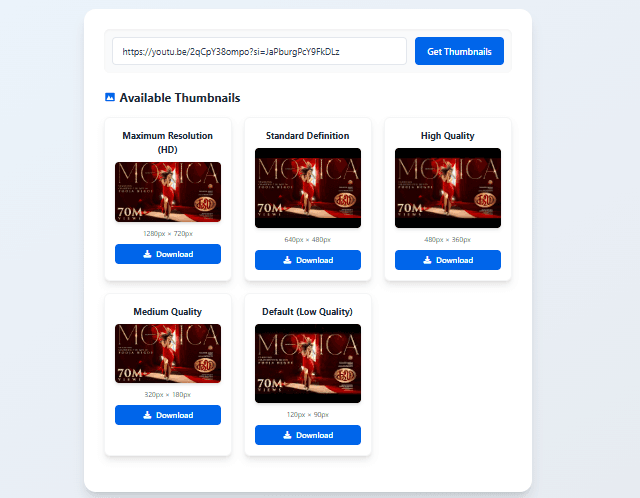
Go to our youtube thumbnail downloader tool. Paste the URL in the input box. Click the Get Thumbnails button.
Step 3: Download
The tool will show you all available thumbnail qualities. Choose the one you need. Click download. The image will save to your device.
That is it. No signup. No payment. No email required.
YouTube Thumbnail Size – What You Need to Know
If you are creating thumbnails or downloading them for reference, you should understand youtube thumbnail size.
YouTube recommends using 1280x720 pixels. That is a 16:9 aspect ratio. This size looks good on both desktop and mobile devices.
Here are all the sizes YouTube generates for each video:
Maximum Resolution (1280x720) – This is the best quality. But not every video has this. Only videos uploaded in HD get this size.
Standard Definition (640x480) – Good for most uses. This is available for almost all public videos.
High Quality (480x360) – Decent quality for quick reference or small screens.
Medium Quality (320x180) – Smaller file size. Good if you just need a quick preview.
Default Quality (120x90) – Very small. Not recommended for any real use.
My advice: Always download the highest available quality. You can always make it smaller later. But you cannot make a small image larger without losing quality.
YouTube Thumbnail Background – Tips for Better Thumbnails
When you download and study good thumbnails, pay attention to the youtube thumbnail background.
Successful thumbnails usually have:
Bright and contrasting colors – Red, yellow, and green grab attention. Avoid dull or dark backgrounds.
Blurred or simple backgrounds – The focus should be on the main subject, not on a busy background.
No empty spaces – Every part of the thumbnail should serve a purpose. Empty space makes the thumbnail look unprofessional.
If you are creating your own thumbnails, spend time on the background. A good background can double your click-through rate. I learned this the hard way. My early thumbnails had messy backgrounds and nobody clicked. Once I fixed that, my views went up.
Can You Download YouTube Live Thumbnail?
Yes, you can. Many people ask me this question.
A live stream also has a thumbnail. Even if the live stream has ended, you can still download its thumbnail using the same method.
Simply copy the live video URL and paste it into our youtube live thumbnail downloader tool. The tool will extract the thumbnail just like it does for regular videos.
If the stream is currently live, you will get the default thumbnail that YouTube auto-generates. Some creators change thumbnails after the stream ends, so you may want to check back later.
Do You Need a YouTube Thumbnail Downloader Extension for Chrome?
You might see many chrome extensions that claim to download youtube thumbnails. I have tried a few.
Here is the truth: You do not need a youtube thumbnail downloader extension chrome or firefox.
Extensions have problems:
They ask for permission to read your browsing history. Some extensions show ads. A few even contain malware. And extensions stop working when Chrome updates.
Our tool works without any extension. No installation. No permissions. Just paste the URL and download.
If you still want an extension, search for "youtube thumbnail downloader chrome" in the Chrome Web Store. Read the reviews before installing. But honestly, you do not need one.
Thumbnail for YouTube Free Download – Is It Really Free?
Yes. Our tool is completely free. You can download any thumbnail for youtube free download without paying anything.
There are no hidden limits. No daily download caps. No premium version.
I built this tool because I was tired of paid services that charge money for something so simple. Downloading a thumbnail should not cost anything.
YouTube Thumbnail Edit – What to Do After Downloading
Once you download a thumbnail, you might want to edit it. Here is what you can do with a youtube thumbnail edit:
Add text – Use Canva, Photoshop, or even Microsoft Paint to add text over the thumbnail.
Crop to different sizes – Instagram needs square images. Twitter needs landscape. Crop your downloaded thumbnail to fit different platforms.
Extract colors – Upload the thumbnail to a color picker tool. Get the exact hex codes of colors used. Then use those colors in your own designs.
Create a thumbnail library – Save downloaded thumbnails in folders organized by date, creator, or topic. This becomes a valuable reference library over time.
YouTube Thumbnail Maker – How to Create Your Own
After downloading and studying many thumbnails, you will want to make your own. Here is a simple youtube thumbnail maker workflow:
Step 1: Open Canva or Photoshop. Set canvas size to 1280x720 pixels.
Step 2: Choose a background image. Either take a photo or find a free stock image.
Step 3: Add a person's face (usually you) with a dramatic expression. Surprise, excitement, or curiosity work well.
Step 4: Add bold text. Use big, readable fonts. Yellow or white text with a black outline is a classic combination.
Step 5: Add arrows or circles to draw attention to specific areas.
Step 6: Save as JPG or PNG. Upload to YouTube.
That is the basic formula. Most top creators follow this pattern.
Website Thumbnail Downloader – Bonus Tip
Our tool is for youtube thumbnails. But what if you want to download thumbnails from other websites?
A website thumbnail downloader works differently. For general websites, you can use browser developer tools. Right click on any image and select Inspect. Find the image URL and open it in a new tab. Then save it.
But for YouTube, our tool is much faster.
Frequently Asked Questions
Q: Can I download a youtube thumbnail from any video?
A: Yes, as long as the video is public. Private videos, unlisted videos, and age-restricted videos may not work.
Q: How to download youtube thumbnail on mobile phone?
A: The same way. Open our tool in your mobile browser. Paste the URL. Download. The image will save to your phone gallery.
Q: What is the best youtube thumbnail size?
A: 1280x720 pixels. Always use this size if you are creating thumbnails.
Q: Is there a youtube thumbnail downloader app for Android or iOS?
A: There are many apps on the Play Store and App Store. But most show ads or require payment. Our website works on mobile browsers without installing any app.
Q: Can I download a youtube live thumbnail?
A: Yes. Use the same tool. Paste the live stream URL. Download the thumbnail.
Q: Do I need a youtube thumbnail downloader extension chrome?
A: No. Our tool works without any extension. Extensions are unnecessary for this task.
Q: Is thumbnail for youtube free download really free?
A: Yes. Completely free. No charges. No subscriptions.
Q: Can I edit the downloaded thumbnail?
A: Yes. The downloaded file is a standard JPG image. You can edit it with any image editing software.
Q: What resolution will I get?
A: The tool shows all available resolutions. The highest is 1280x720. The lowest is 120x90. Choose what you need.
Q: How many thumbnails can I download per day?
A: No limit. Download as many as you want.
My Final Advice
I have been using this tool for my own work for over a year. It saves me time. It helps me learn from successful creators.
If you are a content creator, start downloading thumbnails from your favorite channels. Study them. Create a folder for each channel. Notice patterns. Then apply what you learn to your own thumbnails.
If you are a blogger or marketer, use thumbnails to make your content more visual. A single image can make a blog post much more engaging.
And remember, the best way to learn is by doing. So go ahead. Copy a YouTube URL. Paste it in the tool. Download a thumbnail. See how easy it is.
Try the YouTube Thumbnail Downloader Now – Free
Have questions? Leave a comment below. I read every one.
Tags: youtube thumbnail downloader, how to download youtube thumbnail, youtube thumbnail size, youtube thumbnail background, youtube thumbnail maker, youtube live thumbnail download, youtube thumbnail downloader extension chrome, thumbnail for youtube free download, youtube thumbnail edit, website thumbnail downloader, youtube thumbnail downloader app, youtube thumbnail downloader live, youtube thumbnail downloader extension firefox, youtube thumbnail downloader chrome, youtube live thumbnail downloader, can you download youtube thumbnail