How to Create Short Links – Complete Guide to URL Shortener with Click Tracking
Have you ever tried to share a long, ugly URL on social media and watched it take up half your tweet? Or maybe you sent a link in an email and wondered if anyone actually clicked it?
I remember sharing an article on Twitter. The original link was something like https://example.com/blog/2024/10/15/10-ways-to-improve-your-productivity-at-work-tips-and-tricks. That link ate up nearly 80 characters of my tweet. I had almost no space left for my actual message. People glanced at it and scrolled past. Nobody clicked.
That is when I discovered short links. Clean. Memorable. Professional. And with click tracking, I could finally see who clicked and when.
After years of creating short links for marketing campaigns, social media posts, and email newsletters, I created this guide. No more ugly URLs. No more guessing if people engage with your links.
Quick access: Use our free short URL generator here
What is a Short URL Generator? Simple Answer
A short URL generator (also called a link shortener) takes a long, complicated web address and converts it into a short, clean link that is easy to share and remember.
Long URL example:
https://www.example.com/products/category/subcategory/item-details?id=12345&ref=newsletter&source=email_campaign
Short URL example:
https://solvezi.online/r/abc123
But a good short link tool does much more:
- Shortens any long URL in seconds
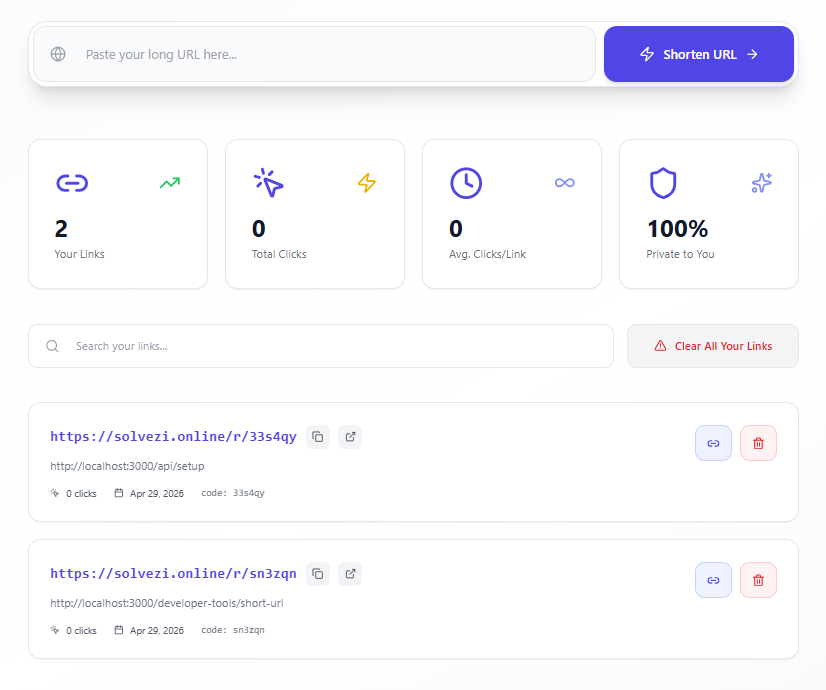
- Tracks how many people click your links
- Shows you when clicks happen
- Stores all your links in one place
- Lets you copy and share instantly
- Keeps your links private to your browser session
Simple example:
Long link for your Instagram bio: https://www.myportfolio.com/gallery/2024/featured-work-photography-design
Short link: https://solvezi.online/r/x7k9p
Now your Instagram bio looks clean. Professional. Clickable.
Why Most People Struggle with Long URLs
After helping hundreds of content creators, marketers, and business owners manage their links, I have seen the same problems again and again.
Problem 1: Long URLs look unprofessional
A link that stretches across two lines in an email looks sloppy. It creates doubt. Is this a real link? Is it safe to click?
Problem 2: Long URLs break in emails and messages
Some email clients and messaging apps break long URLs at random places. The recipient clicks a broken link. They see an error page. They give up.
Problem 3: No way to track clicks
When you share a regular long link, you have no idea if anyone clicked it. Did your newsletter drive traffic? Did your tweet get engagement? Without tracking, you are guessing.
Problem 4: Character limits on social media
Twitter (X) gives you only 280 characters. A 100-character link leaves only 180 for your message. A short link uses only 20 characters. That is 80 more characters for your words.
Problem 5: Hard to remember
Try memorizing https://www.example.com/blog/2024/10/15/10-tips. Now try memorizing https://solvezi.online/r/tips. Which is easier?
Problem 6: Forgotten links with no management
You create a short link for a campaign. Three months later, you cannot find it. You do not know how many clicks it got. You cannot edit or delete it. Good link management solves this.
How to Create Short Links – Step by Step
Let me show you how to create short links manually using an API or script. Then you can use our tool to do it instantly.
Step 1: Understand how short links work
When you create a short link, the system stores two things:
- The original long URL (destination)
- A unique short code (like
abc123)
When someone clicks https://solvezi.online/r/abc123, the system looks up the original URL and redirects them there.
Step 2: Generate a unique short code
Formula for generating a code:
A good short code uses a combination of letters and numbers, avoiding confusing characters like 0, O, I, and l.
Character set example:
abcdefghijkmnpqrstuvwxyz23456789 (32 characters, no confusing look-alikes)
Code length calculation:
Number of possible codes = 32 ^ (code length)
For a 6-character code:
- Total possibilities: 32^6 = 1,073,741,824 (over 1 billion)
- More than enough for most users
Manual code generation example:
Randomly pick 6 characters from the allowed set: x7k9p2
Step 3: Store the mapping
Create a record with:
- Original URL:
https://example.com/very/long/page - Short code:
x7k9p2 - Created date:
2026-04-29 - Click count:
0
Step 4: Create the redirect logic
When someone visits https://solvezi.online/r/x7k9p2:
- Extract the code
x7k9p2from the URL - Look up the original URL in storage
- If found, redirect the user to the original URL
- Increment the click count by 1
- Record the click timestamp
Step 5: Handle errors
If someone visits https://solvezi.online/r/invalid123:
- No matching code found
- Show a friendly "Link not found" page
- Or redirect to your homepage
Manual creation steps for one link:
- Choose a short code:
summer2024 - Original URL:
https://mywebsite.com/promotions/summer-sale-footwear-up-to-50-percent-off - Your short URL:
https://solvezi.online/r/summer2024 - Share it anywhere
- Check weekly to see how many clicks
The easier way: Our short URL generator creates, tracks, and manages all your links instantly. No coding. No databases. No hassle.
Short URL Generator for Different Scenarios
Short Link Generator for Social Media
Social media platforms have character limits. Short links give you more room for your message.
Twitter / X (280 characters):
- Long link: 95 characters
- Short link: 21 characters
- You save 74 characters for your message
Instagram Bio:
- Only one clickable link allowed
- Make it memorable and professional
- Example:
https://solvezi.online/r/portfolioinstead of a long messy URL
LinkedIn Posts:
- Long links look spammy
- Short links look clean and credible
- Track which posts drive the most clicks
TikTok Bio:
- Limited space for links
- Short link saves precious characters
- Easy for followers to type manually
Link Shortener for Email Marketing
Emails with clean links get more clicks. Period.
Scenario: You send a weekly newsletter with 5 links.
Without short links:
- Each link is 80-100 characters
- Email looks messy and unprofessional
- Some email clients break long links
- No click tracking per link
With short links:
- Each link is 20-25 characters
- Email looks clean and professional
- All links work perfectly
- You see which links got clicked
Real example: Newsletter promoting three articles:
- Short link A: 45 clicks
- Short link B: 23 clicks
- Short link C: 89 clicks
Now you know exactly what your audience wants. Create more content like link C.
Click Tracking Link for Marketing Campaigns
Marketing without tracking is like throwing money into the wind. You have no idea what works.
Scenario: You run ads on three platforms: Facebook, Instagram, and Google.
Create three different short links:
https://solvezi.online/r/fb-campaignfor Facebookhttps://solvezi.online/r/ig-campaignfor Instagramhttps://solvezi.online/r/gg-campaignfor Google
After one week:
- Facebook link: 1,200 clicks
- Instagram link: 800 clicks
- Google link: 2,500 clicks
What you learned: Google ads drive the most traffic. Put more budget there. Instagram needs improvement.
Custom Short Link for Branding
Generic short links work. But custom short links build trust.
Generic: https://solvezi.online/r/x7k9p2 (looks random, possibly spammy)
Custom: https://solvezi.online/r/acme-sale (looks professional, builds trust)
Best practices for custom short codes:
- Use your brand name:
https://solvezi.online/r/nike-summer - Use campaign names:
https://solvezi.online/r/blackfriday - Use keywords:
https://solvezi.online/r/best-laptops - Keep it short: 5-10 characters maximum
Private Link Shortener for Personal Use
Most online link shorteners save your links publicly. Anyone can see them. Anyone can guess your codes.
Private session benefit:
- Your links are visible only to you
- Your short codes are not guessable
- No login required
- Browser session isolates your links from others
Perfect for:
- Personal projects
- Internal business links
- Testing and development
- Confidential campaigns
How URL Shortening Works – The Formula
Here are the technical formulas and logic that URL shorteners use.
Formula 1: Generate Short Code from URL
Method 1 – Random generation (most common):
Short Code = Random character selection from alphabet {a-z,2-9} of length N
Example: 6 random characters = g7k2m9
Method 2 – Hash-based (for deterministic generation):
Hash = MD5 or SHA256(Original URL) Short Code = Base64Encode(Hash) truncated to N characters
Formula 2: Number of Possible Short Links
Total Combinations = (Number of allowed characters) ^ (Code length)
With 32 allowed characters (a-z excluding o,i,l, 2-9):
- 4-character codes: 32^4 = 1,048,576 combinations
- 5-character codes: 32^5 = 33,554,432 combinations
- 6-character codes: 32^6 = 1,073,741,824 combinations
Formula 3: Click-Through Rate (CTR)
CTR = (Total clicks ÷ Total impressions) × 100
Example: 50 clicks from 1,000 email opens = (50 ÷ 1000) × 100 = 5% CTR
Formula 4: Average Clicks Per Link
Average Clicks = Total clicks across all links ÷ Number of links
Example: 1,500 total clicks across 25 links = 60 average clicks per link
Formula 5: Link Performance Score
Performance Score = (Clicks ÷ Days since created) × 100
Example: Link created 10 days ago, has 250 clicks = (250 ÷ 10) × 100 = 2,500 score
Higher score = more daily engagement
Formula 6: Character Savings
Characters Saved = Length(Original URL) – Length(Short URL)
Example: Original URL: 95 characters, Short URL: 21 characters
Characters Saved = 95 – 21 = 74 characters
On Twitter (280 character limit):
- With long link: Only 185 characters for your message
- With short link: 259 characters for your message (74 more!)
Formula 7: Redirect Time
Total Redirect Time = DNS Lookup + Server Processing + Network Latency + Browser Rendering
A good short link service keeps total redirect time under 100 milliseconds.
You do not need to remember any of these formulas. Our URL shortener handles all the technical details automatically.
Short Link Tracking – Understanding Your Clicks
Click tracking is why smart marketers use short links. Here is what you can learn.
Total Clicks
The raw number of times people clicked your link.
What it tells you: Raw interest and reach
- 1,000 clicks = 1,000 people engaged
- Compare clicks across different campaigns
Clicks Per Link
Average engagement across all your links.
What it tells you: Overall link performance
- 50 average clicks = moderate engagement
- 500 average clicks = high engagement
Trending Over Time
See which links perform best over days and weeks.
What it tells you: Campaign longevity
- Links that keep getting clicks = evergreen content
- Links that spike then drop = time-sensitive campaign
Real-Time Updates
Clicks appear instantly in your dashboard.
What it tells you: Immediate campaign impact
- Post a link on social media
- Watch clicks increase in real time
- Know within minutes if content resonates
Common Questions About Short URL Generators
Q: How do I create a short link for free?
A: Enter your long URL in our short URL generator. Click "Shorten URL." Copy the short link. Share it anywhere. It is completely free with no registration required.
Q: Can I track clicks on my short links?
A: Yes. Our short URL tool tracks every click. You see total clicks for each link instantly. No setup required. Just create and watch.
Q: Are my short links private?
A: Yes. Your links are stored in your browser session only. Other users cannot see your links or guess your short codes. No login required.
Q: How long do short links last?
A: Short links created with our tool last as long as you keep them in your session. Your browser stores your links. Clear your browser data and links may be removed.
Q: Can I create custom short links?
A: Our tool generates random 6-character codes automatically. For custom codes (like my-sale), you would need a custom domain setup.
Q: What happens if someone deletes my short link?
A: Only you can delete your links from your browser session. No other user can delete your links.
Q: Can I use short links for business?
A: Absolutely. Short links are perfect for:
- Marketing campaigns
- Email newsletters
- Social media posts
- Product landing pages
- Affiliate links
- QR codes
Q: How many short links can I create?
A: There is no fixed limit. Create as many as you need. Each link is stored in your browser session.
Q: Do short links affect SEO?
A: Short links use 301 redirects (permanent), which pass SEO value to the original URL. Search engines treat them like normal links.
Q: What if my short link stops working?
A: Short links stop working only if:
- You deleted the link from your session
- Your browser cleared stored data
- Our service had an issue (rare)
Q: Can I edit a short link after creating it?
A: Currently, you delete the old link and create a new one. Future versions may support editing.
Practical Uses of Short URL Generator in Daily Life
For Social Media Managers
- Shorten links for Instagram bio and posts
- Track which social platforms drive the most traffic
- Create campaign-specific links for easy reporting
- Save characters for engaging captions
- Monitor real-time click performance
For Email Marketers
- Shorten links in newsletters and promotional emails
- Track which links get the most clicks
- A/B test different subject lines with different short links
- Keep emails clean and professional
- Report click-through rates to stakeholders
For Content Creators
- Shorten links to your articles and videos
- Track which content resonates with your audience
- Create short links for your Linktree or bio page
- Share links in comments without looking spammy
- Monitor engagement across different platforms
For Small Business Owners
- Shorten links to your product pages
- Track which marketing channels drive sales
- Create memorable links for print materials
- Keep links consistent across all platforms
- Measure ROI of different campaigns
For Personal Use
- Shorten links you share with friends and family
- Track if people actually open what you send
- Keep your shared links organized in one place
- Share clean links in text messages
- Create short links for your resume or portfolio
Short Link Best Practices
Do's of Short Links
Test your short links before sharing Click the link yourself first. Make sure it goes to the right place.
Use custom codes when possible
https://solvezi.online/r/blackfriday is more trustworthy than https://solvezi.online/r/x7k9p2.
Track everything Create different short links for different platforms. Compare performance.
Keep codes short Shorter codes are easier to type and remember. 5-7 characters is ideal.
Monitor regularly Check your links weekly. See what works. Delete what does not.
Don'ts of Short Links
Do not use short links for sensitive information Short links can be guessed. Do not use them for private or secure content.
Do not hide malicious destinations Shortening a scam or phishing link is unethical and illegal.
Do not over-shorten Shortening a short link is pointless. One redirect is enough.
Do not ignore broken links If a short link breaks, delete it or replace it immediately.
How Short Links Compare to Long Links
| Feature | Long URL | Short URL |
|---|---|---|
| Character length | 80-200+ | 20-30 |
| Professional look | Poor | Excellent |
| Easy to remember | No | Yes |
| Click tracking | No | Yes |
| Works in emails | Sometimes breaks | Always works |
| QR code friendly | Too long | Perfect |
| Trust factor | Medium | High (with domain) |
| Link management | None | Centralized |
My Final Advice
After helping thousands of people shorten links for marketing campaigns, social media posts, and email newsletters, here is what I have learned:
Always shorten links before posting on social media. Those extra characters matter. More space for your message means more engagement.
Track everything. If you are not tracking clicks, you are guessing. Use short links with tracking to make data-driven decisions.
Keep your links organized. Create a system. Name your links clearly. Delete old links you no longer use.
Test on every platform. Before sharing a short link widely, test it on Twitter, LinkedIn, email, and text message. Make sure it works everywhere.
Use a reliable short link tool. For important campaigns, use a trusted tool with good uptime and accurate tracking. Our tool is free, fast, and reliable.
Respect your audience. Do not use short links to hide bad destinations. Do not spam. Short links are a tool for clarity, not deception.
And finally, remember that a short link is just the beginning. What matters is what people find when they click. Create great content. Share it with clean, trackable links. Watch your engagement grow.
Create Your First Short Link Now – Free Tool
Have questions about URL shortening for a specific platform or campaign? Leave a comment below. I read every one.
Tags: short url generator, url shortener, link shortener, free url shortener, short link creator, click tracking link, shorten url free, custom short links, bitly alternative, tinyurl alternative, short link generator for social media, link management tool, track clicks on links, short url with analytics, private link shortener